


COOKmate - My recipe organizer
4.75.59K Reviews
App Specs
- Version
- Varies with Device
- Updated On
- License
- Free
- Downloads
- 1,000,000+
- Developer
- Maadinfo Services
- Categories
- Food & Drink
- Platform
- Android, iOS
Screenshots
 Analysis by AppCompare
I like keeping recipes in one place, but I’ve learned that collecting them is only useful if I can find the right one when dinner is already underway. A recipe organizer earns its spot on my phone by making that everyday task easier, not by turning cooking into another project to manage. COOKmate - My recipe organizer is designed around that practical idea: save recipes, bring them in from elsewhere, and build a personal collection you can return to.
Trust, control, and the way I’d use it
As a food and drink app from Maadinfo Services, COOKmate sits in a fairly personal corner of my digital life. A recipe collection can reveal routines, dietary preferences, and the meals I make for other people. I therefore judge it less by promises about being a kitchen companion and more by whether the tools fit my habits and whether I can make sensible choices about what I keep and share.
The app is free to download, with in-app purchases ranging from $2.49 to $104.99 per item. That makes it easy to try the basic approach before deciding whether paid options suit the way I cook. Its 4.7 average from around 45,000 ratings suggests many users find value in it, while the large gap between a quick rating and a written review is a useful reminder to judge it against your own routine, not popularity alone. It has over a million installs and is rated for Everyone.
What I would check before building a recipe archive
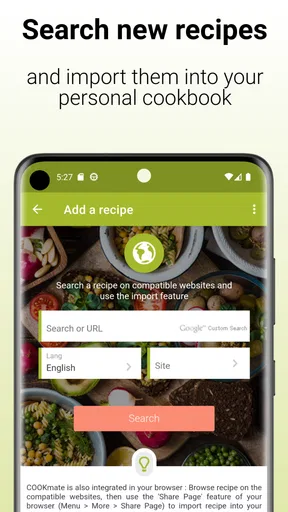
Recipe import is convenient, but importing something is not the same as having a clean, dependable record. When I save a recipe from a website, I’d take a moment to check the ingredient list, quantities, and method rather than assume every page will transfer perfectly. The app’s web import can need manual adjustment on some sites, so treating the imported version as a draft is a sensible habit. That small check is especially worthwhile for recipes with several components or instructions embedded in a page’s formatting.
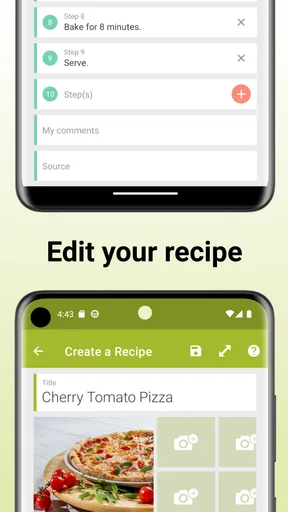
I’d also decide early how much information I want in the collection. A quick note about a substitution or a photo of the finished dish can be genuinely useful later, but adding every cooking thought can make a recipe harder to scan. My approach would be to record only details that change what I do next time: whether a sauce needed more acid, whether the oven time ran long, or which ingredient I swapped. That keeps the archive helpful without turning it into a diary I never reread.
Useful choices, with a few practical limits
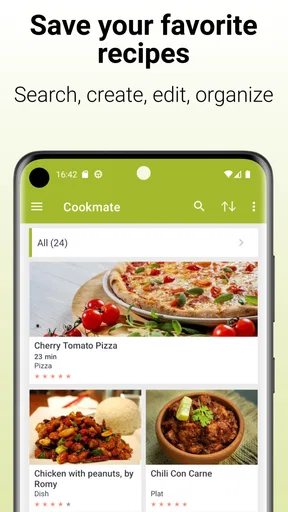
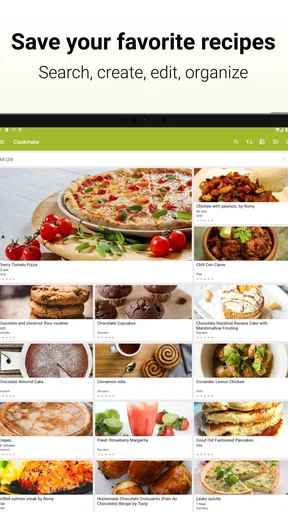
The app’s recipe management, search, and import focus gives it a different feel from simply saving browser bookmarks or keeping screenshots in a camera roll. A bookmark points back to a page that may be difficult to search across; screenshots preserve a visual snapshot but are awkward when I need to find one ingredient or compare several meals. A dedicated recipe collection is more useful when I want to build a reusable library, though it asks me to spend a little time organizing and checking entries.
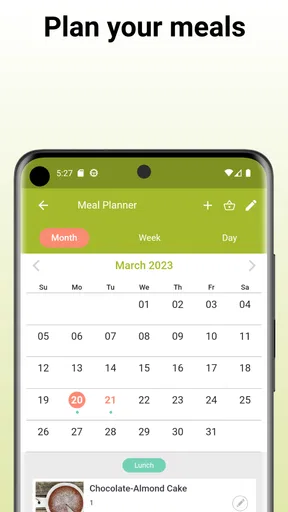
It is also worth distinguishing a recipe organizer from a general meal-planning or grocery tool. Planning and shopping-list features can help connect saved dishes to the week ahead, but the biggest reason I would choose this app is to keep recipes together. If I mainly want automatic meal suggestions, nutritional tracking, or a very hands-off shopping workflow, I’d first check that those specific needs are met before making it my main food app. The best fit is someone who already has recipes worth keeping and wants a more orderly way to use them.
Worth Reading Before You Choose

EA SPORTS FC Mobile 26 Is a Bigger Football Game, but It Takes Time

Flipboard Shows What News Apps Must Do Beyond the Feed

Switching to Android Auto Means Rethinking Your Driving Routine

Google Calendar Makes a Crowded Week Easier to Manage

Ludo King Makes the Most of the Minutes Between Plans

Baby Panda World Brings Quick Play to Modern Phones, but Its Game Library Feels Busy
Who benefits most, and when another approach is better
I can see COOKmate working well for a home cook who has recipes scattered across family notes, websites, and personal experiments. It is particularly appealing if you like adapting dishes and want your own notes to stay beside the original instructions. A person who cooks from a small, fixed set of meals may get less from maintaining a dedicated collection; a notes app or a simple folder of saved pages might be enough. Likewise, if you strongly prefer paper and rarely search digitally while cooking, adding and organizing recipes could feel like extra work rather than a convenience.
For a shared household, I’d think about who will maintain the collection. A recipe library is most valuable when the people who cook can find and understand the entries, so consistent titles and clear notes matter. If one person imports recipes while everyone else relies on verbal instructions, the app may not solve the underlying coordination problem by itself. It can organize food ideas, but the household still needs an agreed way to choose meals and keep the list current.
A realistic weeknight workflow
Imagine I find a promising lentil stew online during lunch and want it for dinner. I can bring the recipe into the collection, then review the imported ingredients and fix anything that came across awkwardly. Before shopping, I can use meal planning and the shopping list to connect that dinner to the ingredients I need. At the stove, the saved method is easier to revisit than a browser tab buried among unrelated pages. Afterward, a short note about using less salt or adding lemon can make the next attempt more reliable.
The value in that sequence is not a dramatic cooking shortcut; it is reducing small points of friction. I don’t have to remember which site had the recipe, reconstruct my changes from memory, and separately make a shopping reminder. But this workflow depends on a little care at the start. If I import recipes and never correct errors or add useful notes, I’m simply building a larger pile of digital clutter.
Sharing and personal information deserve a pause
Sharing a recipe can be handy for a potluck or a family meal, especially when someone needs the instructions without having to search for the original page. I’d still check what I’m sharing before sending it: personal notes may be meant for me, while the recipe itself is suitable for everyone. Keeping those two purposes clear helps avoid passing along an unfinished experiment or a private comment along with a polished recipe.
For data-sensitive choices, I would review the app’s current permission prompts and account or sharing settings on my own device before relying on any particular setup. I don’t treat the presence of a recipe manager as proof of how information is stored or handled. The practical advice is simple: grant only permissions that make sense for the action I’m taking, check the visible choices before syncing or sharing, and avoid placing sensitive personal details in recipe notes. That is a measured way to use any app that may hold a long-running personal collection.
Getting started without creating extra work
Rather than importing everything at once, I’d start with a small set: a few dependable meals, one family recipe, and a recipe I want to try soon. This tests whether search, categories, and the import process fit my habits before I invest time in moving a whole archive. It also exposes a useful question early: do I naturally remember to open the app when planning meals, or do I keep returning to the same scattered sources?
I’d use titles that are easy to recognize at a glance, then add categories only when they help me make a real choice. Sorting by cuisine or ingredient can be useful when I’m trying to use what is already in the fridge; a difficulty label can help when I need something low-effort. But too many categories can become another filing chore. A simple system that matches how I search is more useful than an elaborate taxonomy I have to maintain.
How it fits among recipe apps
Compared with a general notes app, COOKmate is more purpose-built for managing recipes and finding them again. Compared with social cooking platforms, its appeal is less about browsing a feed and more about building a collection around what I actually cook. These are different priorities: a discovery-focused service may be better when I want inspiration from other cooks, while a plain notes app may win if I want maximum flexibility and don’t mind organizing everything myself.
The trade-off is that a dedicated tool becomes valuable only when its organizing habits suit me. If I frequently move between phone, tablet, and computer, the ability to access a collection across devices is attractive; if I prefer one device and rarely revisit saved recipes, that may matter less. I’d choose based on the part of cooking I want to improve: finding and preserving recipes, discovering new ones, or coordinating meals and groceries. No single app automatically handles all three equally well.
My day-to-day experience with its strengths and friction
The strongest idea here is continuity: a recipe can become something I refine over time rather than a one-off page I lose after cooking. Personal notes and photos can help me recognize what worked, and search makes a growing collection more manageable than a folder of screenshots. Those benefits are most noticeable after I have saved enough recipes to make retrieval a regular need.
The corresponding weakness is the upkeep. Web pages do not always import cleanly, and any manually corrected recipe takes a little attention. That is not a deal-breaker for me, but it does mean I would not promise myself that the app will instantly transform a messy collection into a perfect cookbook. Nor would I move every recipe into it simply because I can. A curated library of meals I might actually cook is more useful than an exhaustive archive I never search.
Where I land
COOKmate is a sensible choice for people who want their recipes to be searchable, reusable, and open to personal edits. I’d recommend trying it if your meals are currently spread across bookmarks, notes, and scraps of paper, and if you are willing to check imports and keep the collection reasonably tidy. I’d skip it if you want cooking inspiration to arrive automatically or dislike maintaining a digital archive.
Its free entry point makes a low-commitment trial possible, while the in-app purchase range is broad enough that I would look closely at what an upgrade offers before paying. Maadinfo Services released the app on July 31, 2010, and its long presence in the recipe-app space is useful context, not a substitute for checking whether the current version fits your needs. I’d start with a handful of recipes, test the workflow through one ordinary week, and decide from there. For me, that is the fairest way to see whether a recipe organizer earns a permanent place in the kitchen.
Getting Started with COOKmate
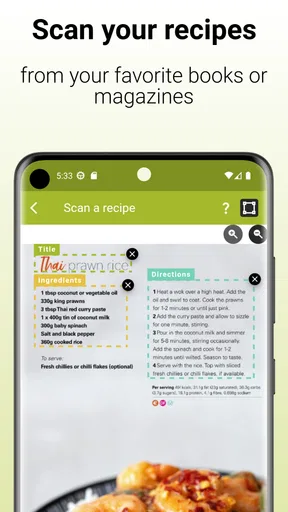
When you first open COOKmate, it feels like stepping into a well-organized kitchen. The intuitive layout welcomes you with open arms, making navigation a breeze. You can easily create new recipes, import from the web, or even add recipes by scanning handwritten notes. Yes, you read that right—handwritten notes! It’s like magic for those of us who cherish Grandma’s cookie recipe scribbled on the back of an envelope.
Features That Make Cooking Easier
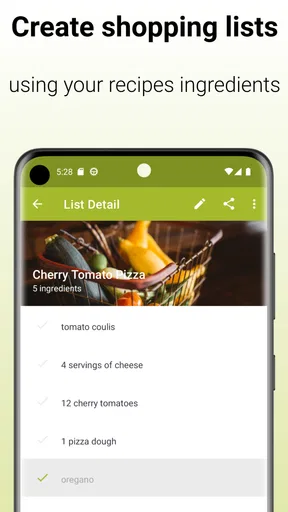
One of the standout features of COOKmate is its customizable categories. Whether you’re sorting by ingredient, cuisine, or even difficulty level, this app has you covered. I love being able to quickly find my go-to vegan dishes when friends are over for dinner. Plus, the integrated shopping list feature means I never forget an ingredient when I'm at the store. Trust me, nothing's worse than getting home and realizing you forgot the cilantro!
COOKmate also allows for meal planning which is a game-changer for busy weeks. You can plan out your meals, and the app automatically generates a shopping list. This feature has saved my bacon more times than I can count, especially on those hectic Monday mornings.
Sharing and Syncing
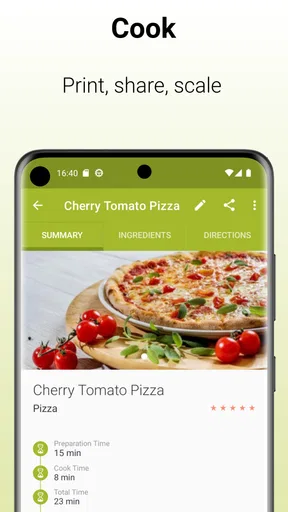
Another great aspect of COOKmate is its sharing capabilities. You can easily share your favorite recipes with friends or family, and they can view them even if they don’t have the app. It makes organizing holiday meals or potlucks super simple. Plus, the cross-device syncing means I can access my recipe collection from my phone, tablet, or computer without missing a beat.
Personal Touches
What truly sets COOKmate apart is the ability to add personal notes and photos to each recipe. I love adding little tweaks and flavor experiments I've tried, and having photos of my best attempts makes the app feel like a personal culinary diary. It’s the small touches like these that make COOKmate feel less like an app and more like a personal kitchen assistant.
Room for Improvement?
No app is perfect, and COOKmate has its quirks. Occasionally, the web import feature can be a bit finicky with certain websites, requiring a bit of manual adjustment. But honestly, these minor hiccups are far outweighed by the benefits. The developers seem receptive to feedback, regularly updating the app to address user concerns, which is always a promising sign.
Moreover, while the app is free to use, there are some advanced features that require a paid upgrade. It’s worth considering if you find yourself using the app daily, though the free version is more than sufficient for most home cooks.
Final Thoughts
In a world overflowing with recipe apps, COOKmate - My recipe organizer manages to stand out by offering a seamless blend of functionality and personalization. Whether you’re organizing family recipes, planning your weekly meals, or sharing culinary creations with friends, COOKmate proves to be an invaluable tool in any foodie’s arsenal. So, if you’re tired of losing track of your recipes and want a trusty digital sous-chef by your side, give COOKmate a whirl. Your taste buds—and your dinner guests—will thank you!
Pros
- Easy to organize personal recipes.
- Supports meal planning and grocery lists.
- User-friendly interface and design.
- Import recipes from websites effortlessly.
- Customizable categories and tags.
Cons
- Limited free version features.
- Occasional sync issues between devices.
- No video tutorials for beginners.
- Some features require premium access.
- Limited integration with other apps.
FAQs for COOKmate - My recipe organizer
What is COOKmate and how does it work?
COOKmate is a comprehensive recipe organizer app designed to help users manage their culinary collection efficiently. It allows you to import recipes from websites, create your own, and organize them into categories. You can also generate shopping lists and plan meals, making it an all-in-one solution for home cooks.
Can I sync my recipes across multiple devices?
Yes, COOKmate offers cloud synchronization, allowing you to access your recipes from any device. By creating an account, you can seamlessly sync your data across smartphones, tablets, and computers, ensuring your recipes are always available, whether you're at home or on the go.
Does COOKmate support different diet preferences?
Absolutely! COOKmate caters to various dietary needs and preferences. You can filter and categorize recipes based on specific diets such as vegetarian, vegan, gluten-free, or keto. This makes it easy to find recipes that align with your dietary restrictions or preferences.
Is it possible to import recipes from external sources?
Yes, COOKmate provides a feature to import recipes directly from popular cooking websites. Simply paste the URL into the app, and it will automatically import the recipe, including ingredients, instructions, and images. This feature saves time and enhances your recipe collection effortlessly.
Are there any costs associated with using COOKmate?
COOKmate offers both a free version and a premium version with additional features. The free version includes basic functionalities, while the premium version offers advanced features such as unlimited cloud storage, ad-free experience, and additional customization options. The choice depends on your needs and budget.


